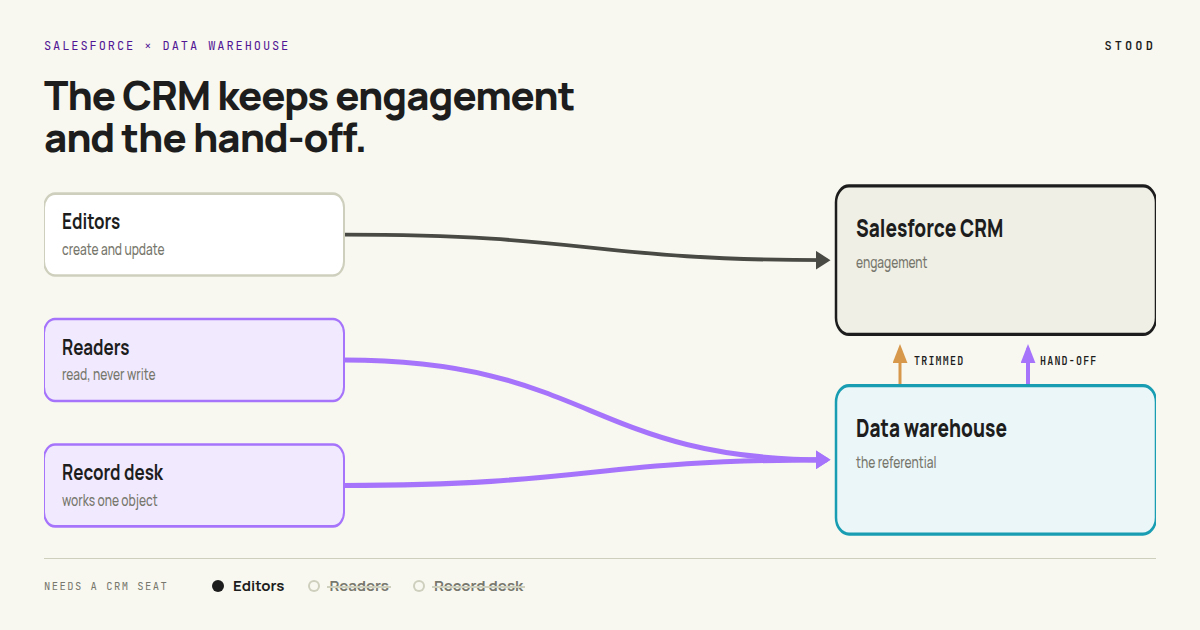
Open an enterprise Salesforce org and sort its objects by how often a human writes to them. A few are genuine workplaces: a salesperson lives in the opportunity, an agent lives in the case. Others are not. They are read far more than they are written, most of what happens to them happens by automation, and several teams need them at once. Leads, consent, campaign references. They are referentials, not workplaces — and they are in the CRM because, when they arrived, nowhere else was ready.
Somewhere else is ready now. Most enterprise orgs already sync their key data to a data warehouse, and the sync runs both ways: CRM data goes out for analytics, and reference data comes back in — ERP customers, products, pricing, usage, scores — so that users can see it in context on the record.
That second direction is the tell. Data is copied into Salesforce so that people can read, in the CRM, what the warehouse already holds. And every one of those people needs a seat to do it.
Two costs for one need: a seat for everyone who looks, and a copy of the warehouse to look at. The pattern below removes both, in two steps, without touching the processes that belong in the CRM.
Today. Anyone who needs to look holds a Salesforce seat. Reference data is copied into Salesforce so they can see it on the record, and the warehouse serves analytics only.
Illustrative architecture
Step 1 — the people who only read
They stop opening Salesforce. They open a small web app with their company login: a search, a record page, the related lists and figures they used to check, and nothing else. No warehouse vocabulary, no queries, no BI tool — the warehouse serves the data behind the screen, the way a database sits behind any application.
Visibility follows the CRM: row access policies give each user what they could see in Salesforce, and no more. Nothing changes for the people who create and update records, because nothing about their workplace has moved.
What changes is the licensing unit. A reader is no longer a CRM user. The seat is not reassigned or downgraded — it is not needed, and it comes back at renewal.
Step 2 — the desks that work one object
For selected records, the object itself moves upstream. Lead management is a clear example. The lead desk works in a focused app built for one job — qualify and convert — running on the warehouse, on its own runtime and database. The rep never sees any of that. They see a lead, its context, and a Convert button.
Everything around the lead — ERP status, product usage, marketing touches, CRM history — is read in place from the curated datasets, at the moment the rep opens the record. Nothing is copied into Salesforce to make that context visible.
Northbridge Logistics
Inbound · pricing page · 2 days ago
Company
- ERP customerNo
- Group parentExisting client
- Employees1,200
Product usage
- Trial workspaces3
- Active users, 14 days27
- Feature depthHigh
Marketing touches
- Webinar, Sept.Attended
- Emails opened6
- Last campaignQ4 renewal
CRM history
- Open opportunities0
- Parent account ownerK. Martin
- Last caseNone
That is the whole screen. The only write back to the CRM is the hand-off: when a lead converts, the app creates the account, contact and opportunity in Salesforce, and the sales process continues where it always ran. The CRM receives the outcome, not the working. Inbound sync shrinks to what the remaining CRM processes still need, and the warehouse stops being only an analytics store and starts being a referential the business works against.
The desk, like the readers, needs no CRM seat.
What moves, what stays
| Today | Step 1 · Readers | Step 2 · Record desks | |
|---|---|---|---|
| Who needs a Salesforce seat | Everyone who looks | Editors and the record deskreaders drop out | Editors onlythe desk drops out too |
| What users open | Salesforce | Readers: a small read-only appnew | + the desk: an app built for one objectnew |
| Warehouse skills users need | — | None | None |
| Inbound sync to Salesforce | Full reference copy | Unchangedsame | Only what CRM processes still needlower |
| What the warehouse is | An analytics store | Analytics, and what readers read | A referential the business works against |
| What the CRM keeps | Everything | Everythingsame | Engagement, and the hand-off it receives |
| Build effort | — | Views, access policies, SSO, a read UI | One app per object, with a hand-off to Salesforce |
The CRM keeps engagement. It keeps the objects people genuinely work in, the automation around them, the packaged features, the sharing model. What leaves is the referential layer that was only ever parked there.
Which records can move upstream
- Own lifecycle with one exit. The record ends in a single hand-off, like lead conversion.
- Heavy on reference data. Users mostly need context that already sits in the warehouse.
- High volume, short life. Many records, most never reach the rest of the CRM.
- A focused user group. The people working it rarely touch other Salesforce objects.
- Deep in sharing and automation. Opportunities tied to territories, approvals or forecasting.
- Coupled to packaged features. CPQ quotes, service entitlements, managed-package objects.
- Written by many teams. Records several processes update in turn.
- Needed in real time by integrations. Anything other systems read from the Salesforce API.
Where the saving lands
On the per-seat line, and nowhere else worth counting.
This is the point of the pattern: readers and record desks are often a large share of the named users on a CRM contract, and neither group needs a seat once the records they touch are reachable upstream. The saving is the count of those users multiplied by your own contracted rate per seat — not a list price, not a blended average, the rate your last renewal actually set. A second, smaller saving follows the copies: the inbound sync that existed only to display warehouse context in the CRM stops being built and maintained.
Two honest subtractions. Warehouse compute goes up — read queries on curated datasets are small next to the sync workload already running, but they are not nothing — and the landing zone and each desk app have to be built. Both are measured in a pilot rather than assumed, and both are netted off before anyone quotes a number.
We are deliberately not putting a percentage here. The share of your users who only read is a measured figure, not an industry constant, and it is the first thing an analysis returns.
Illustrative architecture. Stood Flows measures which users only read, which objects carry the inbound copies, and what the contract charges for both — read-only, with no Stood cloud in the data path. A Quickstart is a couple of hours with one of our experts on an org you own.