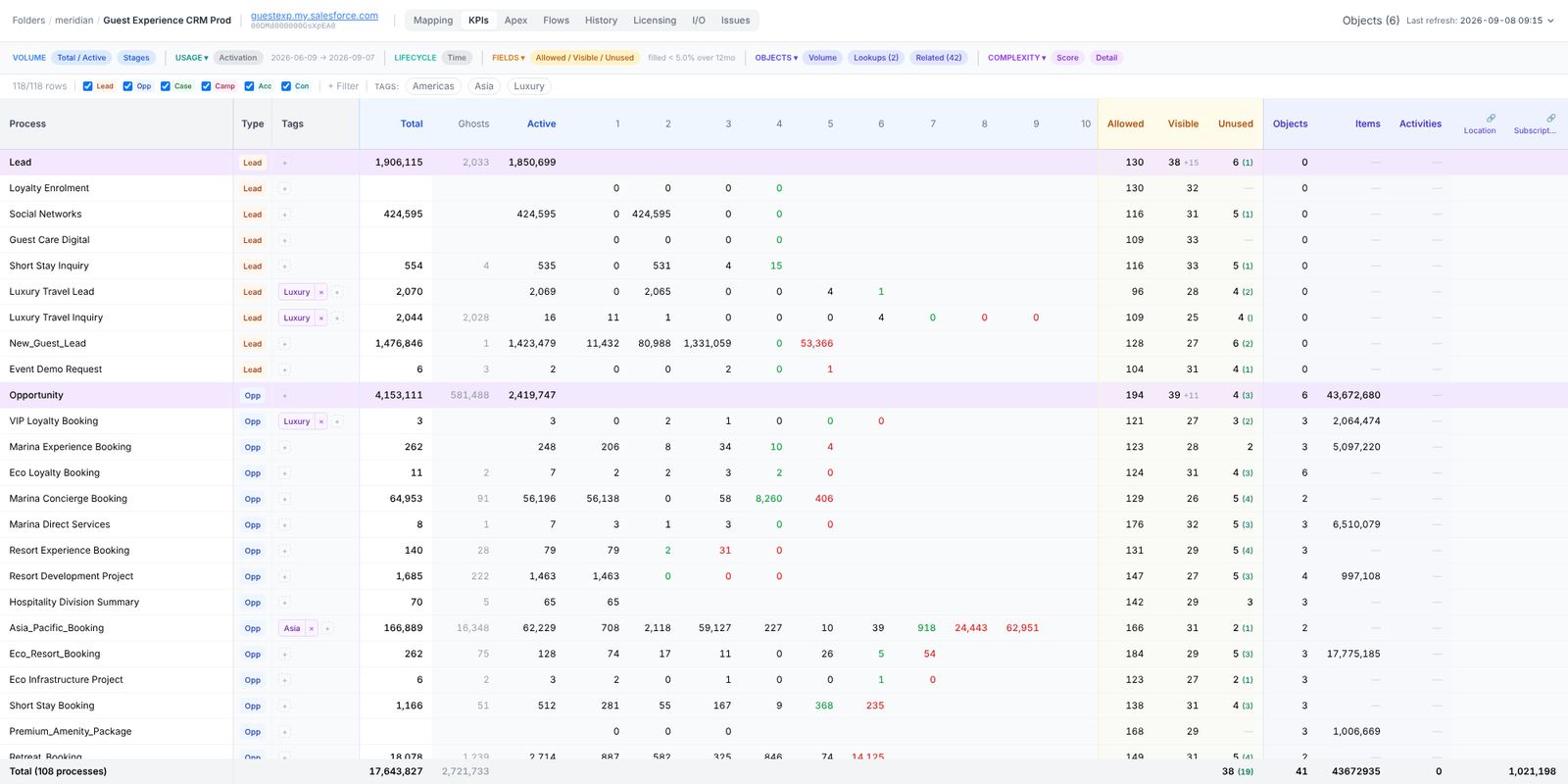
Field usages adds three columns to the KPI table, under Fields. They answer one question per process: of the fields the people working this record type can see, which ones does nobody fill in?
The funnel
- Allowed — fields the profiles that see this record type may read, from field-level security.
- Visible — the subset that actually appears on the record type’s page layouts. Only these are judged: a field nobody is shown is a field nobody can fill.
- Unused — of the visible ones, those filled on fewer than 5% of the records created in the window (twelve months by default). The figure in brackets is how many of those you could delete — your own custom fields. Standard and managed-package fields can only leave the layout.
So a cell that reads 12 (8) means twelve unused fields, eight of them deletable.
How a cell is measured
For every field, one windowed COUNT(field) per record type, anchored on the creation date and narrowed automatically when the org times out (twelve months, then six, then three). Booleans, long text and record types with an empty window are judged on a sample of the 2,000 most recent records instead, because COUNT cannot answer for them.
Three outcomes are kept apart:
- Unused — measured, below the threshold. A finding.
- Unmeasurable — no field-level access for the connected user, an unsupported type, or a query that timed out. Listed with the reason, never counted as unused.
- No records — nothing created in the window, so fill cannot be judged. The cell reads —.
With a Read-Only connected user, roughly one field in five is measurable; a broader read-only permission set on the audit user, still with no write, is what makes the column complete. Nothing in the analysis can write.
Per record type, then the master row
A field that is empty on one process can be the whole point of another. Measured on the object, a field reads as used; measured per record type it may be filled on 0.4% of one process and 61% of another. The master row keeps the intersection: a field is unused for the object only when every record type that shows it leaves it empty, and shows as 3/4 (unused on three of the four record types that show it).
The field panel
Click Unused or Visible to open the list: each field with its exact fill rate, the sample size, which layouts show it, whether it is your own, standard or managed, and the verdict. The threshold slider re-filters locally; it reads nothing from Salesforce, so try a few values.
Fields on no layout, in the same menu, lists custom fields nobody put in front of any user. It is a softer signal (an integration can still write such a field, a report can still read it), so treat it as a place to look rather than a list to act on.
Running it
The analysis is off by default in a full run: tick Field usage, or launch it from the Fields menu above the table. Field schemas are a regular step of the Salesforce refresh since 1.3.2, so the metadata side is already there; the measurement is the part that takes time on a large org.