One row per record type, because that is where the org actually splits
An Opportunity object can hide six businesses. Stood Flows gives each of them its own row, so complexity, usage, cost and stage health are read on the unit a team actually owns.
Almost everything that makes a Salesforce org heavy is scoped to a record type: page layouts, profile visibility, record-triggered flows with their entry conditions, validation rules that test a status, the picklist a process offers. Counted on the object, these pile into one number nobody can act on. Sliced by record type and business process, each piece lands on the process it serves, and the row that says this process is complex also says this is who can touch it, how often it moves and how much it costs.
Process slicing · one object, three rowsSTOOD
record-type specificattributed by parsingmaster fallback
Illustrative — Meridian Hospitality Group, synthetic demonstration estate. Record types shown are 3 of 108 processes.
Anatomy of a row
Every column group answers one question about the same process. Click a group to see what the columns mean and where the number comes from.
KPI matrix · column groupsSTOOD
Process
Total
Ghosts
Active
1 … N
Modified
Actors
Score
Stages
Profiles
Triggered flows
Rules
Objects
Items
Allowed
Visible
Unused
Opportunity
4,153,111
581,488
2,419,747
35 cols
311,207
1,214
149
35
55
1
16
21
1
412
188
3/4
Residences Sales
2,803,110
70,122
1,902,340
17 cols
288,004
906
82
17
12
9
38
14
1
380
141
31 (22)
Marina Concierge Booking
64,953
91
56,196
5 cols
4,811
63
24
5
6
0
0
3
1
380
62
12 (8)
Eco Loyalty Booking
11
2
7
5 cols
0
0
22
5
6
0
0
0
0
380
62
—
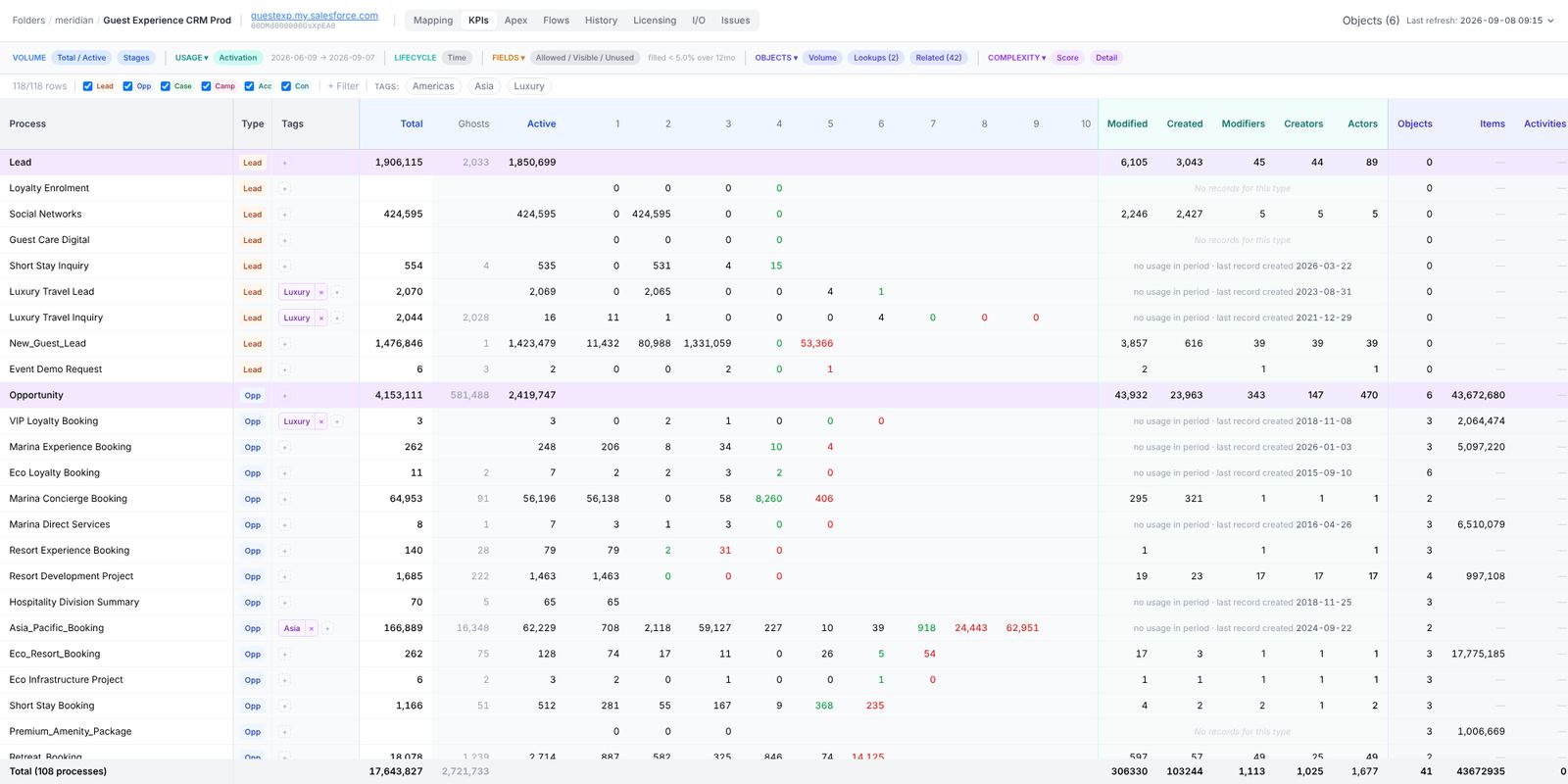
Volume. Total is the exact record count per record type. The numbered columns are the stages this record type's process offers, in picklist order. Active is the sum of the non-final stage columns. Ghosts are the records the stage columns cannot account for, so stages + Ghosts = Total, always, by construction.
Usage. Records modified and created in the window, and the distinct users who did it (modifiers, creators, actors). A row where every usage column reads 0 for a year is the strongest signal a record type can be retired.
Complexity. Score is the plain sum of seven counts: stages, profiles, layouts, pages, triggered flows, triggers, validation rules. Unweighted, so it always equals the visible sum and can be checked by hand. Each cell opens the list of items it counted.
Objects. Related custom objects that hold rows under this record type, line items (OpportunityLineItem, CampaignMember), records with a closed activity, then one column per lookup or related-list object. Extremes on both ends are the finding: 21 custom objects under one record type, or a child with 0.3% of its parent's volume.
Fields. Allowed: fields this record type's profiles may read. Visible: on its layouts. Unused: visible yet filled on under 5% of records created in the window. 12 (8) reads as 12 unused, 8 of them deletable (the org's own custom fields); the rest are standard or managed and can only leave the layout. The master row shows an intersection across the record types that show the field, as 3/4.
Illustrative — Meridian Hospitality Group. Usage over 12 months; Fields threshold 5% on records created in the window. The real table carries more columns; this is the reading order.
How to read the stages column
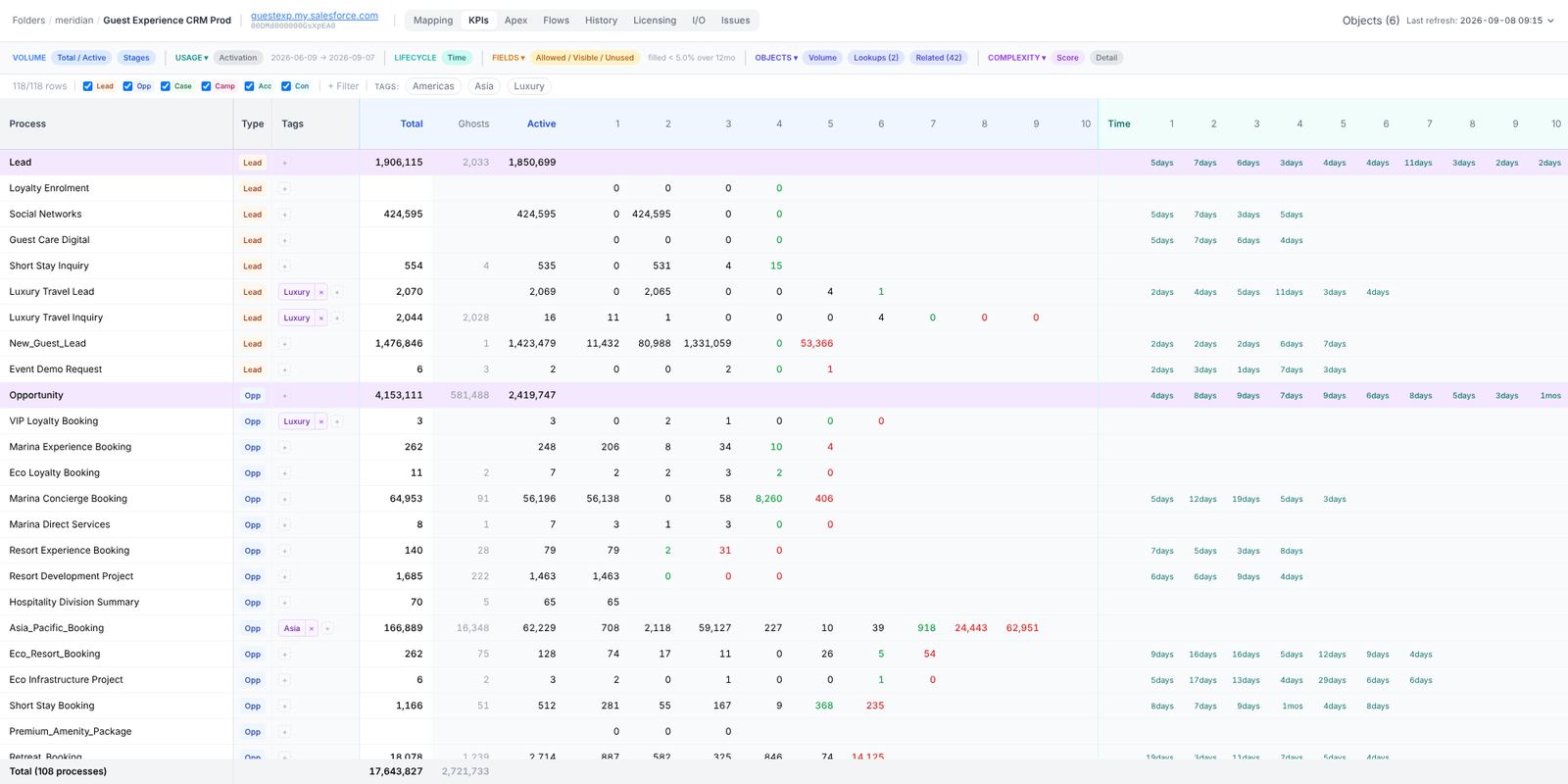
Stage columns are numbered 1 … N and sized to the widest record-type process, never to the master picklist. Columns are ordered open stages, then positive finals, then negative finals, so the shape of a healthy process is a slope that ends on the right. The numbers under each stage are records resting there now; the Time toggle swaps them for the average days a record spends in that stage, computed from field history over a sliding year.
Stages column · Concierge Intake CaseSTOOD
Illustrative — Meridian Hospitality Group, Hospitality Operations Hub org. Counts are records resting in each stage at the last refresh; the identity stages + ghosts = total is enforced by the app, not by rounding.
What this means on Monday. Open the matrix, sort by Score, and look at the Total next to it. Every row with a two-digit score and a two-digit record count is a candidate before anyone opens Setup.
Account and Contact: same row, no stages
Account and Contact get the same scaffolding (record types, profiles, layouts, flows, triggers, rules, related objects, licence allocation) with a different mental model. They classify rather than progress, so their process column holds sources and the Stages, Active and Ghosts columns stay empty. The matrix separates them from the four lifecycle objects with a thicker border, and a custom object that behaves like a backbone object can be promoted to get identical rows.
In the app
Captured from the application itself, built from the current source tree and opened read-only on the Meridian demonstration workspace.
The matrix on the Meridian flagship org: Volume group open, stage columns 1…10, master rows tinted. 118 rows, 108 processes.Lifecycle → Time swaps the counts for the average days a record spends in each stage.