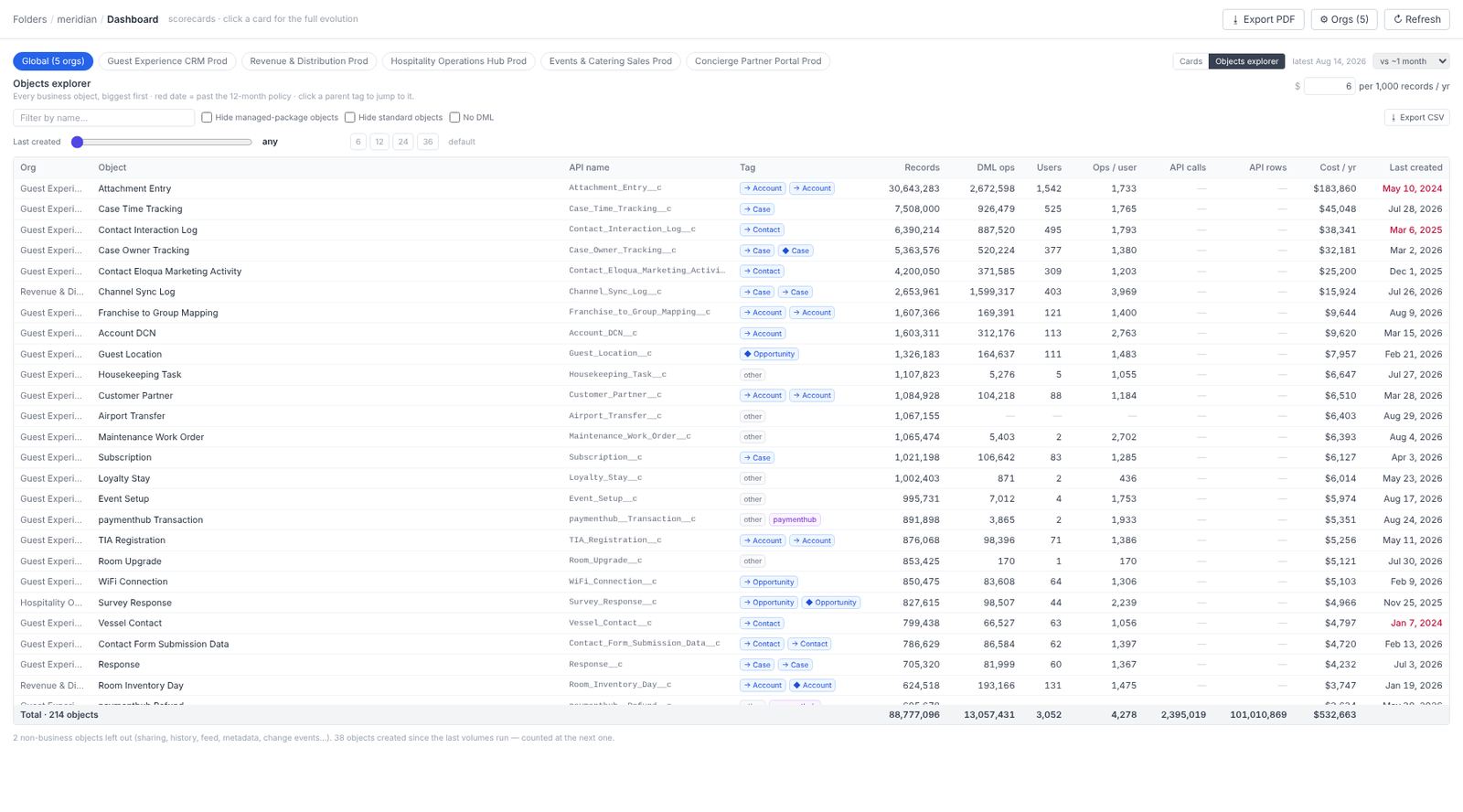
The Objects explorer is the second view of the folder dashboard (the toggle next to Cards). Where the cards summarise, the explorer lists: every business object across every org in the folder, biggest first, one row per object.
What a row shows
| Column | What it is |
|---|---|
| Org | Which org the object lives in. The same API name in two orgs is two rows. |
| Object and API name | Label and developer name. Managed-package objects keep their namespace and are flagged, not dropped. |
| Tag | Backbone, custom, managed package, or telemetry (log-shaped tables). |
| Records | Record count, from the record-count endpoint or one COUNT() per object when the object-volumes step has run. |
| DML ops and Users | Writes in the event-log window and the distinct users who made them. |
| Visits | Screen views that showed this object, from the Visits analysis, when it has run. |
| API calls and API rows | Inbound API traffic on the object, from the I/O analysis. |
| Cost / yr | A storage estimate: about 2 KB per record at Salesforce’s list price per 500 MB block, roughly $6 per 1,000 records a year. Swap in your contract rate. |
| Last created | When a record was last created on the object. |
Share, history, feed, log and metadata tables are left out: they are not business objects and would only push the real ones down.
Two filters, one verdict
No DML in window keeps the objects nobody wrote to during the event-log window. Last created N+ months keeps the ones with no new record for the folder policy’s idle period (twelve months by default). An object that passes both is a stale-object candidate: it is counted on the dashboard’s Global objects card and feeds the removal backlog.
Sort by Cost / yr with both filters on and you have the storage line of a business case before anyone has qualified a single object.
What to look for
- Big, written by one user, visited by none. A telemetry table filled by an integration at one row every few seconds and never opened by a person. Ask who reads it, and where; usually a warehouse already has the data.
- Millions of records, zero DML, last created years ago. Storage paid for monthly for an object nobody writes or opens.
- Object families. Near-duplicate names (
Stay,Stay_Log,Stay_Analytics) are the trace of successive projects. Sort by name to see a family together.
Where it comes from
The explorer reads files the analyses already wrote — object volumes, the custom-object inventory, the DML and I/O aggregates, the Visits aggregates — so it opens without an org call. Refresh on the dashboard re-reads those files; it never queries Salesforce. The Visited objects hand-off from the Visits view opens the explorer filtered to the objects people actually looked at.